Key Feature
• 4.3-Inch LCD - Adds a larger local battery-status interface.
• SOC Readout - View charge information from the matched system.
• JK Display Accessory - Select by the complete BMS identity.
• Separate from V19 - Preserves the requested catalogue distinction.
• Panel Integration - Plan the enclosure around the actual screen drawing.
₹2,186.00
JK 4.3-Inch Battery SOC Display
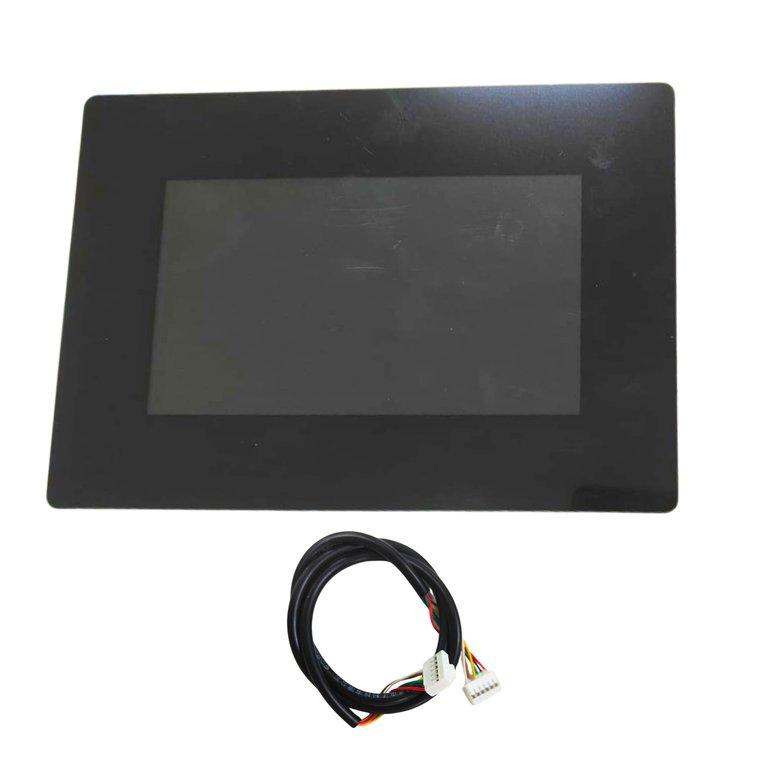
The JK 4.3-Inch Battery SOC Display is the catalogue's 4.3-inch LCD option without the V19 suffix. It provides a local charge-status interface when paired with the correct JK battery-management system and display connection.
The larger screen format can be incorporated into a battery enclosure or an equipment panel where a dedicated viewing area is required. Its selection should remain tied to the actual board generation and the screen label, especially when several JK display variants are being purchased for different projects.
The LCD is an interface to battery information supplied by the management system. It does not independently increase the accuracy of the BMS, provide extra balancing current or change the battery's protective limits. A displayed SOC value remains an estimate that depends on the configured battery and the measurements reported by the board.
Within a brand, screen diagonal alone is not a compatibility specification. JK's conventional smart-active-BMS display family and version-specific inverter/ESS displays should be treated as different products until the exact pairing is established. A similar-looking housing or a familiar connector cannot replace that check.
Identify the management-board model and revision and match them to the complete display label and harness. Keep this item separate from the specifically requested V19 4.3-inch screen. For replacement work, compare the existing hardware rather than assuming that the newest display family is a direct substitute.
Use the installation drawing to define the panel cutout, retaining method and rear clearance. Allow for connector access and cable routing when the screen is fitted. Establish which local information or controls are needed in the finished product, and confirm that the approved display/BMS combination provides those functions before the enclosure design is finalised.
Applications
• Battery-panel projects using an approved JK 4.3-inch LCD.
• Local SOC indication on a matched management-board family.
• Replacement of the same non-V19-designated catalogue variant.
• Battery enclosure development and front-panel planning.
• Commissioning verification of the display and BMS connection.
Installation Guide
Install the display with the battery isolated and protect the enclosure from conductive debris. Follow the exact screen and board instructions for supply and signal wiring. Do not connect the screen to an inverter communication socket merely because that socket uses a similar connector or familiar communication name.
Confirm that the display starts and that its charge information agrees with the intended BMS. Check updating and the documented control behaviour before completing the installation. Preserve the approved model pairing and wiring details with the equipment record. A future change of battery-management board should include a fresh screen-compatibility review, even when the physical panel opening remains unchanged.
Why Choose ARB Accessories?
ARB Accessories offers JK monitoring accessories alongside battery-management and pack-assembly components for Indian buyers. Provide the complete BMS model and revision, the display label and the intended mounting arrangement when enquiring. Matching these details at the purchasing stage helps distinguish similar-looking screens and keeps replacement parts consistent with the equipment already in use.
Product overview
JK 4.3-Inch Battery SOC Display The JK 4.3-Inch Battery SOC Display is the catalogue's 4.3-inch LCD option without the V19 suffix.
- SKU
- 26000579
- Category
- Battery SOC Display
- Brand
- JKBMS
- Unit
- PCS
- Minimum order
- 1 PCS
- Availability
- In Stock
Review key features and technical specifications before ordering. Contact ARB Accessories if you need compatibility or bulk-order guidance.
Datasheet
Datasheet