Key Feature
• UART Interface - Select for a matched JBD communication port.
• Compact LCD Format - Suits space-conscious panel layouts.
• SOC Readout - View the charge estimate supplied by the BMS.
• Local Battery View - Check charge status at the equipment.
• JBD System Accessory - Pair with the correct board and harness.
₹449.00
JBD Small UART LCD Battery SOC Display
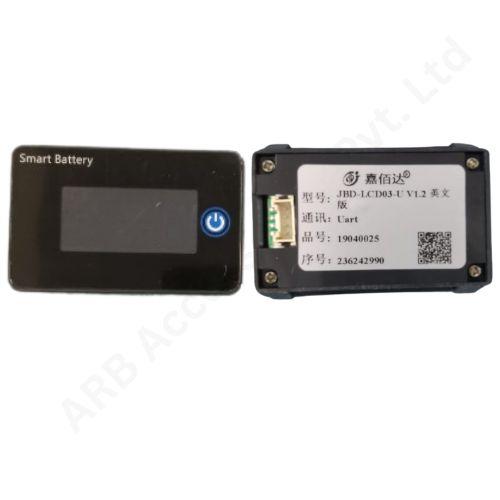
The JBD Small UART LCD Battery SOC Display is a compact screen for viewing the charge status of a compatible JBD battery-management system. Its UART interface distinguishes it from the separately specified RS485 small display.
This format suits a build where the user needs a local charge indication but available panel space is limited. A dedicated display also gives an assembler a consistent place to present battery status, rather than making a phone or computer the only route to an everyday check.
UART is the communication path used by this variant. The display and BMS must agree on the electrical interface and the messages being exchanged; fitting a connector alone does not establish that agreement. The screen presents the state-of-charge information supplied by the matched battery-management system.
SOC describes the estimated charge remaining, not the measured health or tested capacity of the battery. A useful reading therefore depends on correct BMS configuration and normal operation of its measurement system. A display cannot correct an incorrectly entered battery capacity or replace the cell monitoring performed by the BMS.
Identify the full JBD board model, the available UART port and the display's rear label before ordering. Check the approved harness and its supply arrangement, especially when the same board also has Bluetooth or another communication accessory. Do not assume that two accessories can share a port without the manufacturer's approved arrangement.
The small designation is a product variant, not an installation drawing. Confirm the panel opening, rear clearance and cable exit using the supplied unit's dimensions. Keep this item distinct from the larger JBD UART LCD and from the small RS485 version throughout procurement, assembly and spare-parts records.
Applications
• Compact battery-pack front panels with compatible JBD BMS.
• Local SOC indication on matched battery equipment.
• Space-conscious battery-box development projects.
• Service replacement of the same UART display variant.
• Battery assembly checks before enclosure completion.
Installation Guide
Install the screen with the battery isolated and protect its low-current wiring from adjacent power connections. Follow the wiring instructions for the exact board and display revision. Avoid connecting a communication lead to a battery terminal or repurposing a lead from a different manufacturer.
During commissioning, compare the displayed SOC with the BMS's own reported value and confirm that the reading updates. Verify the expected behaviour after power cycling and after any communication accessory is connected. Secure the harness so that panel movement does not strain the connector, and retain the approved display and BMS pairing in the assembly record. Label the approved UART connection in the assembly drawing so later maintenance does not accidentally substitute another interface.
Why Choose ARB Accessories?
ARB Accessories brings JBD battery-management accessories together with cells, connectors and assembly consumables for Indian battery businesses. Share the BMS model, display variant and required cable arrangement when making an enquiry. This makes the purchase more specific and helps keep the chosen screen, communication connection and battery enclosure aligned with the same build specification.
Product overview
JBD Small UART LCD Battery SOC Display The JBD Small UART LCD Battery SOC Display is a compact screen for viewing the charge status of a compatible JBD battery-management system.
- SKU
- 26000564
- Category
- Battery SOC Display
- Brand
- JBD
- Unit
- PCS
- Minimum order
- 2 PCSs
- Availability
- In Stock
Review key features and technical specifications before ordering. Contact ARB Accessories if you need compatibility or bulk-order guidance.