Key Feature
• UART Communication - Pair with an approved JBD display port.
• Colour Touch Interface - Navigate the supported display pages.
• Cell-Voltage Page - View individual readings from the BMS.
• Local Battery Information - Inspect status at the equipment.
• Large Catalogue Variant - Distinct from the small UART screen.
₹1,695.00
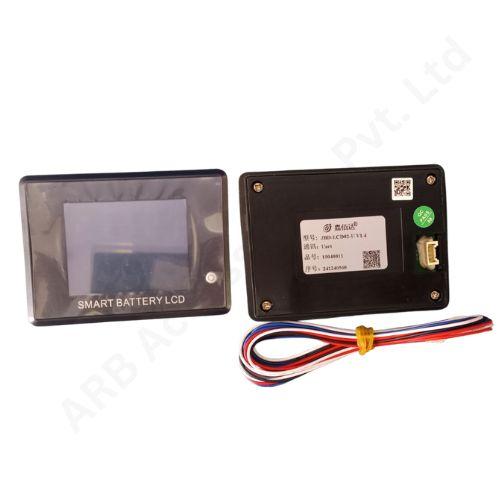
JBD Large UART LCD Battery SOC Display
The JBD Large UART LCD Battery SOC Display is a local colour touch interface for a compatible JBD BMS. The LCD02-family display provides battery information and an individual cell-voltage page through its specified UART connection.
Compared with a simple level gauge, a multi-page interface gives the operator a more detailed view of the information collected by the management system. It can be incorporated into a battery enclosure where service access to the internal electronics would otherwise be inconvenient.
Technical Performance & Engineering Details
The referenced LCD02 family uses a 2.8-inch TFT colour display with touch navigation. Its battery-data pages include cell-voltage information, while the supported control interface can interact with the connected BMS. The screen is a communication accessory: measurement, protection and charge estimation continue to depend on the board and its configured battery system.
Individual cell readings are useful for recognising differences within a pack, but interpretation requires the operating context. Charging current, recent use and the selected battery chemistry all matter. A visual cell comparison does not replace a controlled capacity test or an engineering assessment of a suspect battery.
Confirm the LCD02 label and select the UART version; the manufacturer also documents an RS485 option that is not interchangeable by name alone. Check the intended BMS port, harness and allowed accessory arrangement, particularly where Bluetooth equipment is already fitted.
The word big distinguishes this catalogue item from the smaller UART product and should not be substituted for an enclosure drawing. Verify the screen body, cutout, panel thickness and rear clearance before fabrication. Also identify which display controls are appropriate for the final operator and which should remain part of a supervised service procedure.
Applications
• Matched JBD BMS systems needing a local colour interface.
• Battery enclosures with space for the LCD02-format display.
• Inspection of supported individual cell-voltage readings.
• Service replacement of the same large UART variant.
• Commissioning of approved BMS and display combinations.
Installation Guide
Use the exact display/BMS wiring instructions and isolate power while making connections. Check the display supply separately from the UART signal arrangement; never treat communication pins as battery power connections. Secure the wiring so that inserting the screen does not pull on the board connector or pinch the harness behind the panel.
Verify that the displayed values agree with the BMS, that pages respond normally and that the screen remains associated with the intended battery. Exercise any permitted control functions only within the approved test procedure. Record the final label, revision and harness arrangement so that a future screen replacement can be identified without repeating the entire compatibility investigation.
Why Choose ARB Accessories?
ARB Accessories brings JBD battery-management accessories together with cells, connectors and assembly consumables for Indian battery businesses. Share the BMS model, display variant and required cable arrangement when making an enquiry. This makes the purchase more specific and helps keep the chosen screen, communication connection and battery enclosure aligned with the same build specification.
Product overview
JBD Large UART LCD Battery SOC Display The JBD Large UART LCD Battery SOC Display is a local colour touch interface for a compatible JBD BMS.
- SKU
- 26000568
- Category
- Battery SOC Display
- Brand
- JBD
- Unit
- PCS
- Minimum order
- 1 PCS
- Availability
- In Stock
Review key features and technical specifications before ordering. Contact ARB Accessories if you need compatibility or bulk-order guidance.
Datasheet
Datasheet