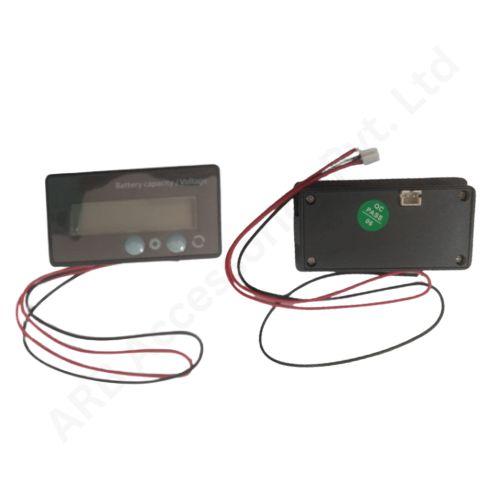
BATTERY INDICATOR
Key Feature
• Charge-Level Indication - View the battery condition locally.
• Dedicated Battery Accessory - Adds an operator-facing status point.
• GY-6CS Catalogue Reference - Helps identify the intended unit.
• Charging Awareness - Supports routine battery-status checks.
• Replacement Selection - Match the existing unit before installation.
₹150.00
Battery Indicator for Local Battery Charge Monitoring
The Battery Indicator is a dedicated battery charge-level accessory for a compatible battery system. It provides an operator-facing status point that can be incorporated into a battery enclosure or another appropriately designed equipment panel.
A simple indicator is useful when the immediate requirement is an understandable charging cue rather than a detailed engineering dashboard. Its purpose is to help the user check the battery condition at the equipment, with the meaning of the indication established by the approved battery and indicator combination.
The catalogue reference for this item is GY-6CS. A material reference is useful for enquiry and replacement identification, but the electrical configuration must still match the actual unit. Battery chemistry, the intended voltage profile and the way the gauge receives its information determine whether the displayed level is meaningful.
A charge indicator is not a charger, cell balancer or capacity-testing instrument. A full indication does not establish that every cell has equal voltage or that the battery retains its original rated capacity. Battery protection remains the responsibility of the correctly designed BMS and the rest of the electrical system.
Start with the battery's complete operating range and the exact indicator label. Establish whether the stated voltage relates to its power supply, a battery nominal rating or a configured measurement profile. These are different requirements and should not be treated as interchangeable.
Compare the intended enclosure opening, panel thickness and accessible cable route before preparing the mounting. Decide where a user will read the indication and how it will be explained in the equipment instructions. For service replacements, preserve the old wiring record and confirm the replacement reference instead of identifying the part only from its front shape or colour.
Applications
• Local battery charge checks on compatible systems.
• Battery-enclosure indication after mechanical matching.
• Like-for-like replacement of an identified gauge.
• Prototype battery-pack user interfaces.
• Equipment builds needing a simple charging-status cue.
Installation Guide
Disconnect the battery from the installation work area and prevent accidental contact between live terminals and tools. A trained installer should check the approved wiring diagram and connector functions before connecting the gauge. Do not assume that a wire colour or a familiar connector establishes its electrical role.
After installation, compare the indication with the expected battery state at more than one operating point. Include a charging and an operating check where the approved test procedure permits it. Investigate a fixed, implausible or missing indication rather than treating it as evidence that the battery is full or empty. Keep the mounting secure and make the meaning of each displayed state clear to the operator.
Why Choose ARB Accessories?
ARB Accessories offers battery indicators alongside BMS boards, connectors, wiring and battery assembly components for Indian buyers. Prepare your enquiry with the battery chemistry, operating voltage and a photograph of the intended mounting location. Selecting these items together helps align the user-facing indication with the electrical design instead of purchasing a gauge by appearance alone.
Product overview
Battery Indicator for Local Battery Charge Monitoring The Battery Indicator is a dedicated battery charge-level accessory for a compatible battery system.
- SKU
- 26000563
- Category
- Battery SOC Display
- Unit
- PCS
- Minimum order
- 10 PCSs
- Availability
- In Stock
Review key features and technical specifications before ordering. Contact ARB Accessories if you need compatibility or bulk-order guidance.
Datasheet
Datasheet